How to use StreamPilot

How to use StreamPilot

Your ultimate AI companion for TikTok Live.

Your ultimate AI companion for TikTok Live.

Quick Start: Get up and running in just two steps.

Quick Start: Get up and running in just two steps.

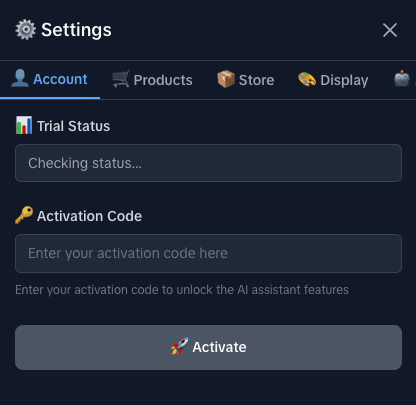
Step 1: Activate Account

  1. Click the Settings icon ⚙️ on the HUD.

  2. Select the "Account" tab.

  3. Enter your activation code.

  4. Click "Activate".

  5. Success! You will see "Status: Active".


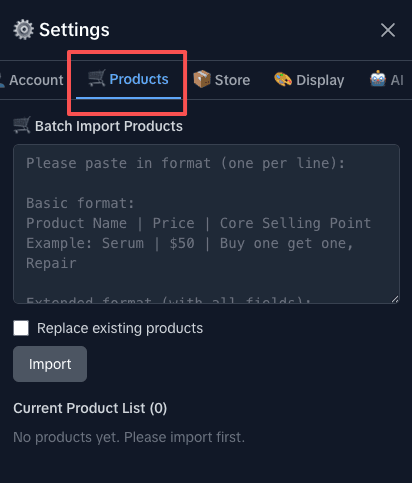
Step 2: Configure Products

  1. Go to the "Products" tab.

  2. Paste product list (Format: Name | Price | Features)

  3. Click "Import".

  4. Important: AI uses this info to answer questions!
Step 3: Start & Go

  1. Open the HUD (floating icon) and toggle the switch to "Start".
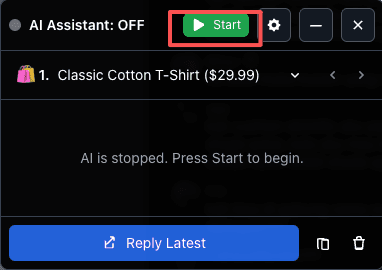
Main HUD

View live insights

View live insights

Settings

Store controls

Store controls

AI Brain

Configure intelligence

Configure intelligence

AI not responding?

1. Check if the Account page shows "Active". 2. Check if the HUD switch is ON. 3. Confirm that product information has been imported.

Inaccurate responses

1. Check if the store information in the Store tab is correct. 2. Check if the currently selected product in the Products tab is correct.

Still have issues?

Please contact our support team via email or the support button below. We are here to help!

AI not responding?

1. Check if the Account page shows "Active". 2. Check if the HUD switch is ON. 3. Confirm that product information has been imported.

Inaccurate responses

1. Check if the store information in the Store tab is correct. 2. Check if the currently selected product in the Products tab is correct.

Still have issues?

Please contact our support team via email or the support button below. We are here to help!

The Ultimate Companion for TikTok Live

Copyright © 2026 StreamPilot. All rights reserved.

Not affiliated with TikTok or ByteDance.

The Ultimate Companion for TikTok Live

Copyright © 2026 StreamPilot. All rights reserved.

Not affiliated with TikTok or ByteDance.

The Ultimate Companion for TikTok Live

Copyright © 2026 StreamPilot. All rights reserved.

Not affiliated with TikTok or ByteDance.